
Ableton Live 12.4 Update: New Features, Link Audio and What Changed
May 04, 2026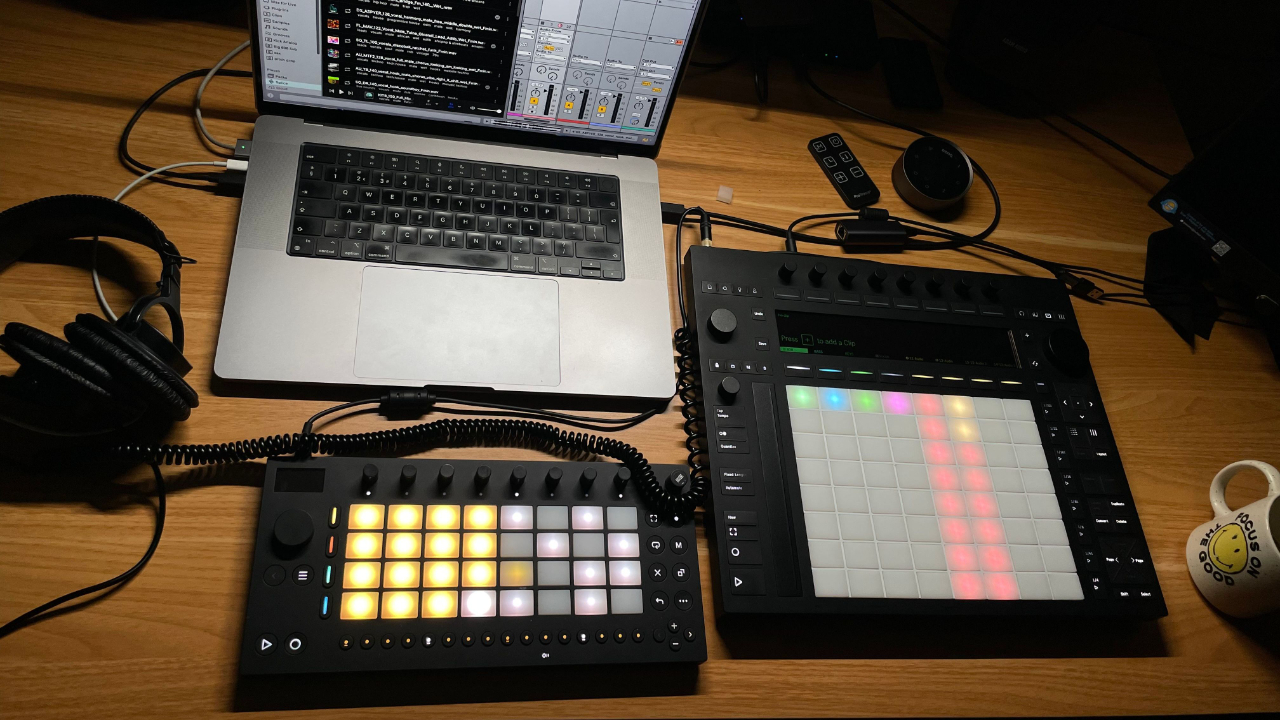
Ableton Live 12.4 is now available, and it is a free update for Live 12 users.
And honestly, this is one of the more interesting Ableton updates I have seen in a while.
Not because it adds some flashy AI generator.
Not because it gives us another hundred presets.
But because it shows where Ableton seems to be heading.
Ableton is not just trying to make Live more powerful.
It is trying to make Live, Push, Move and Note feel like one connected music making system.
That is the bit that matters.
The headline feature in Live 12.4 is Link Audio.
Normal Ableton Link keeps devices in time.
Link Audio goes further and lets you stream audio between compatible Ableton devices over a local network.
So instead of just syncing tempo, you can actually send audio between Live, Push, Move and Note.
That is a big deal.
Especially if you use more than one Ableton device, or you like the idea of starting something on Move, jamming with Note, recording into Live, or using Push as the centre of a more hands on setup.
There are other useful updates too.
Delay has been improved.
Stem Separation is more flexible.
Learn View replaces Help View.
Erosion gets a proper update.
Move and Note get some serious improvements.
But for me, Link Audio is the main story.
It is the feature that makes Ableton’s ecosystem feel more connected, and it hints at where things could go next.
So let’s go through what is new in Ableton Live 12.4, what actually matters, and whether you should update.
Ableton Live 12.4 update: quick summary
Ableton Live 12.4 is a free update for existing Live 12 users.
The headline feature is Link Audio, which lets you stream audio between compatible Ableton devices over a shared local network.
Live and Push can send and receive audio with Link Audio.
Move and Note can send audio out.
The update also includes improvements to Delay, Stem Separation, Learn View, Erosion, Chorus Ensemble, Push, Move and Note.
Here is the quick version.
Link Audio
Stream audio between compatible Ableton devices over a local network.
Delay
New LFO time modes and waveforms.
Stem Separation
More flexible separation with better control over selected parts.
Learn View
A new learning system replaces Help View.
Erosion
Updated display and new modulation options.
Push
Better Link Audio support, MIDI mapping improvements and Max for Live control.
Move and Note
Audio tracks, sample loading, Link Audio sending and more device support.
The short version is this:
If you are already using Live 12, you should update.
If you use Push, Move or Note, you should definitely pay attention.
If you are still getting your head around Ableton and want a clearer starting point before diving into the new features, I have a free Ableton Live training that walks through a simple workflow for getting started.
What is Link Audio in Ableton Live 12.4?
Link Audio is the big new feature in Ableton Live 12.4.
Ableton Link has been around for a while.
It lets devices stay in time with each other over a network.
So you could have Live running on one computer, Note running on an iPhone, or another app using Link, and they would all stay in sync.
That was already useful.
But Link Audio takes it further.
Now, compatible Ableton devices can send audio to each other as well.
That means you are not just syncing tempo.
You are actually moving audio between devices.
So you could have a sound coming from Move, Note or Push and bring that audio into Live without needing to plug audio cables into an interface.
That is the part that feels different.
It starts to make Ableton’s hardware and software feel less like separate products and more like one connected system.
For me, that is the most interesting thing about Live 12.4.
Not because it replaces every cable in your studio.
Not because it is suddenly going to make everyone’s setup perfect.
But because it changes the way you can think about Ableton devices.
Move can be a sketchpad.
Note can be a quick idea tool.
Push can be a performance and studio hub.
Live can be the main arrangement, recording and mixing environment.
And Link Audio starts to join those things together in a way that makes sense.
This is especially interesting if you are using Push as the centre of your setup, because Push is starting to feel less like a controller and more like a proper hub for Ableton workflows. If that is the kind of setup you are building, my Push 3 course goes through the workflow in a much more structured way.
How Link Audio works
The basic idea is simple.
Devices need to be on the same local network.
Link needs to be enabled.
Link Audio needs to be enabled.
Once that is set up, compatible devices can send audio between each other.
Live and Push can send and receive audio.
Move and Note can send audio out.
That means Move and Note can become audio sources that feed into Live or Push.
Live and Push can work both ways.
This is important, because it means Link Audio is not the same on every device.
Live and Push are more flexible.
Move and Note are more like send only devices.
That makes sense when you think about what those products are.
Move and Note are quick idea tools.
Live and Push are more complete production and performance environments.
I have also put together a video on how to set it up
Why Link Audio matters
The obvious use case is convenience.
You can send audio between devices without needing extra cables or routing everything through your interface.
But I think the bigger point is workflow.
A lot of producers use Ableton in different ways depending on where they are.
You might start an idea on Move.
You might sketch something quickly in Note.
You might build a more complete performance setup on Push.
Then you might finish, arrange and mix everything in Live.
Before, those things could feel connected, but not completely joined up.
Link Audio makes the connection feel more immediate.
It also opens up some interesting studio uses.
You could use Move almost like an extra drum machine or sound source.
You could use Note to send quick ideas into Live.
You could route audio from Push into another Live setup.
You could jam with multiple Ableton devices and capture the result more easily.
This is the kind of thing that will probably feel small at first, but become more useful once people start building workflows around it.
That is usually how the best Ableton updates work.
The feature sounds simple.
Then you use it in a real session and realise it solves a problem you have been working around for years.
If you are thinking about using Ableton for live shows, I would still treat Link Audio carefully and test everything properly before relying on it on stage. That kind of preparation is exactly what I cover inside my Ableton Live Performance course.
Ableton Live 12.4 release notes summary
Here is the practical version of the Ableton Live 12.4 release notes.
This is not every tiny bug fix.
This is the stuff most producers will actually notice.
Link Audio
Link Audio lets compatible Ableton devices stream audio between each other over a shared local network.
Live and Push can send and receive.
Move and Note can send audio out.
For anyone using more than one Ableton device, this is the headline feature.
Learn View
Learn View replaces Help View.
This gives Live a more structured learning system inside the software itself.
That is useful because Live can be overwhelming when you are new.
A lot of people open Ableton, see Session View, Arrangement View, clips, devices, routing, warping, MIDI, audio, automation and just think:
Where do I even start?
Learn View should make it easier to understand what is happening without constantly leaving Live to search YouTube or Google.
I like this move.
Ableton does not need to be made simpler by removing features.
It needs better guidance inside the software.
That is what Learn View seems to be trying to do.
If you want a more complete route through Ableton rather than just trying to work it all out from updates and random videos, my Ableton Live 12 course walks through the full workflow from building ideas to arranging, mixing and finishing tracks.
Stem Separation improvements
Stem Separation was already one of the biggest Live 12 features.
In Live 12.4, it gets more flexible.
You can work with more specific sections of audio, rather than always treating the full file in the same way.
That matters for remixing, sampling and quick edits.
For example, you might only want to pull apart one section of a track.
You might only need the vocal from a breakdown.
You might want to isolate a drum section without processing the whole file.
This makes Stem Separation feel more useful as a creative tool, not just a big feature you use once in a while.
Delay update
Delay gets new LFO time modes and waveforms.
That might sound small, but Delay is one of those devices that a lot of producers use all the time.
Small improvements to a device like this can actually matter more than a brand new device you only use once.
The new modulation options should make it easier to create movement, rhythm and more interesting delay effects.
For electronic music producers, that is useful.
Delay is not just for echo.
It can be part of the groove.
It can add width.
It can create movement.
It can turn a basic sound into something that feels alive.
Erosion update
Erosion also gets an update.
It now has a clearer visual display and more flexible modulation options.
I have always liked Erosion because it is one of those Ableton devices that can make a clean sound feel a bit more alive.
It is great for adding noise, grit, texture and a bit of instability.
This update makes it feel more current, and it should make the device easier to understand visually.
That matters because Erosion is powerful, but it has always been one of those devices that some users ignore because it does not look that exciting.
Hopefully this gets more people using it.
Chorus Ensemble update
Chorus Ensemble also gets some attention in Live 12.4.
The update gives more control over delay time and structure.
That should be useful for smoother chorus sounds, especially on guitars, basses, pads and wider synth parts.
Again, this is not the kind of feature that makes a huge headline.
But it is the kind of thing that can improve normal day to day production.
Push updates
Push also gets some important improvements.
The big one is Link Audio support.
Push can send and receive audio using Link Audio, which makes it more useful as part of a connected setup.
That is especially interesting for Push 3 Standalone users.
Push already works well as a central hub for a semi computer free setup.
This makes that idea even stronger.
There are also MIDI mapping improvements and better control over Max for Live devices.
That is good news, because Push is at its best when it feels like a proper instrument rather than just a controller for the computer.
The more control you can get from the hardware, the less you need to keep reaching for the mouse.
If you use Push and want to get more comfortable with the workflow, my Push 3 course goes through it step by step without assuming you already know your way around everything.
Move and Note updates
Move and Note also get some serious updates alongside Live 12.4.
Both can now use audio tracks.
They can also send audio with Link Audio.
That is a big deal for Move in particular.
Move was already interesting as a quick sketchpad, but audio tracks make it feel more flexible.
It means Move is not just about MIDI clips and built in sounds.
It becomes more useful for sampling, recording and capturing ideas.
The Link Audio side means those ideas can be pushed into the wider Ableton setup more easily.
That fits the whole direction of this update.
Ableton seems to be building a system where ideas can start anywhere, then move into Live when you are ready to finish them.
Should you update to Ableton Live 12.4?
Yes, if you are already using Live 12, I would update.
It is free for Live 12 users, and it is not just a tiny maintenance update.
If you use Push, Move, Note, or multiple devices running Live, Link Audio is the main reason to try it.
If you do a lot of remixing or sampling, the Stem Separation improvements are worth having.
If you are newer to Live, Learn View should make the software easier to understand.
If you use Delay or Erosion a lot, those updates are worth checking out too.
The only thing I would say is this:
If you are in the middle of an important project, back up your set first.
That is not because I expect problems.
It is just sensible.
Any time you update software, especially if you are working on client projects, live performance sets, or anything important, make a backup first.
Then update.
Then test.
That is just good practice.
If you are new to Ableton and want a clearer starting point, you can also grab my free Ableton Live training before diving too deep into the new features.
How to update to Ableton Live 12.4
If you already own Live 12, Ableton Live 12.4 is a free update.
In most cases, Live can download updates automatically if automatic updates are enabled.
You can also download the latest version from your Ableton account.
Before updating, I would save a copy of any important projects.
Especially if you are working on:
Client work
Live performance sets
Course projects
Tracks you are about to release
Anything with third party plugins you cannot afford to break
Once you have backed everything up, install the update and open a copy of an existing project first.
Check that everything loads properly.
Then start testing the new features.
Is Ableton Live 12.4 just about Link Audio?
No.
Link Audio is the headline feature, but it is not the only useful thing in the update.
The Stem Separation improvements are useful.
The device updates are useful.
Learn View is a good move.
Push, Move and Note all feel more connected.
But Link Audio is the feature that gives the update its bigger meaning.
Because it is not just a single workflow improvement.
It points towards a bigger idea.
Ableton seems to be building an ecosystem where Live, Push, Move and Note can talk to each other more naturally.
That is what makes this update interesting.
Why Ableton is quietly winning the DAW race
This is the bigger point for me.
A lot of music software companies seem to be chasing the same thing right now.
AI features.
Subscription models.
Ableton seems to be doing something slightly different.
It is building an ecosystem around making music.
Live is still the centre.
Push gives you a hardware instrument for Live.
Move gives you a small sketchpad.
Note gives you quick ideas on your phone.
Link keeps everything in time.
Now Link Audio starts moving sound between devices.
That is the interesting bit.
It is not about adding more random features.
It is about making the whole system feel more connected.
That is why I think Ableton is quietly in a very strong position.
Not because every feature is perfect.
Not because every update is huge.
But because the direction makes sense.
The products are starting to feel like they belong together.
And for producers, that matters.
Because most of us do not need more random tools.
We need fewer barriers between the idea and the finished track.
What this means for producers
For producers, Live 12.4 is useful because it supports the way people actually make music now.
You might not sit down at the computer and finish everything in one perfect session.
You might start an idea on Move.
You might capture something in Note.
You might jam on Push.
You might arrange and finish in Live.
You might use a laptop, an iPad, a phone, a controller, hardware synths, samples and plugins all in the same wider setup.
That is normal now.
The challenge is getting all those ideas into one place without killing the momentum.
That is where Live 12.4 starts to feel important.
Link Audio makes Ableton devices feel more connected.
Stem Separation makes remixing and sampling quicker.
Learn View makes Live easier to understand.
Push gets more control.
Move and Note get more serious.
It all points in the same direction.
Less friction.
More flow.
If you are building a wider Ableton setup and want the full production workflow to make sense, the Ableton Live 12 course is the best place to go deeper.
What I like about this update
The thing I like most is that Live 12.4 feels practical.
It is not just a big flashy update designed to sound impressive in a headline.
The features actually fit real workflows.
Link Audio helps with routing and connected devices.
Stem Separation helps with sampling and remixing.
Delay and Erosion updates help with sound design.
Learn View helps people understand the software.
Push improvements help you stay hands on.
Move and Note updates make them more useful as idea tools.
That is what Ableton is good at when they get it right.
They do not always move the fastest.
But when they do add something properly, it usually fits into the wider workflow.
What I still want to test more
I still want to spend more time testing Link Audio in a real setup.
Especially with Push and Move.
The idea is great.
But the real test will be how stable it feels in normal use.
I want to know how it behaves over WiFi.
I want to test it over a wired network.
I want to see how it feels with multiple devices.
I want to see how useful it is when recording ideas into Live.
And I want to know whether it becomes something I actually use every week, or whether it is one of those features that sounds amazing but only comes out for specific situations.
That is always the difference.
A feature can be clever.
But the best features become boring in a good way.
You just use them.
They become part of the workflow.
That is what I am hoping Link Audio becomes.
Final thoughts
Ableton Live 12.4 is a strong update.
The big feature is obviously Link Audio.
But the update is bigger than that.
It improves devices.
It improves Stem Separation.
It adds Learn View.
It improves Push.
It makes Move and Note more useful.
And most importantly, it makes Ableton’s whole ecosystem feel more connected.
For me, this is where Ableton is quietly doing something smart.
They are not just adding features for the sake of it.
They are making it easier to move between ideas, devices and workflows.
That is what producers actually need.
Not more clutter.
Not more noise.
A better way to get ideas moving.
If you already use Live 12, I would update.
If you use Push, Move or Note, I would definitely try Link Audio.
And if you are new to Ableton Live, this update makes Live feel a little bit easier to approach, while still keeping the depth that makes it powerful.
That is a good place for Ableton to be.
If you want a structured way to learn Live properly, I have a full Ableton Live 12 course that walks through the process step by step.
If you are mainly here for Push, the Push 3 course is the better place to start.
And if your goal is to build a reliable live set, the Ableton Live Performance course is built around making your setup as safe and practical as possible.
Frequently Asked Questions
Is Ableton Live 12.4 free?
Yes.
Ableton Live 12.4 is a free update for existing Live 12 users.
If you already own Live 12, you can update without buying a new licence.
What are the main new features in Ableton Live 12.4?
The main new features are Link Audio, Learn View, updated devices, Stem Separation improvements, Push updates, and improvements for Move and Note.
Link Audio is the headline feature because it lets compatible Ableton devices stream audio between each other over a shared local network.
What is Link Audio in Ableton Live 12.4?
Link Audio lets compatible Ableton devices send audio between each other over a local network.
Normal Ableton Link keeps devices in time.
Link Audio lets them send actual audio too.
Live and Push can send and receive audio.
Move and Note can send audio out.
Does Link Audio work with Push 3?
Yes.
Push can send and receive audio using Link Audio.
That makes it especially interesting for Push 3 users who want to use Push as part of a more connected studio or performance setup.
If you are using Push and want a more structured walkthrough of the workflow, my Push 3 course is built for that.
Does Link Audio work with Move and Note?
Yes, but Move and Note work differently from Live and Push.
Move and Note can send audio using Link Audio.
They do not receive audio in the same way Live and Push can.
That means they are useful as sound sources feeding into the wider Ableton setup.
What changed with Stem Separation in Ableton Live 12.4?
Stem Separation is more flexible in Live 12.4.
You can work with more specific parts of audio, which makes it more useful for remixing, sampling and editing.
That is useful if you only want to separate a section of a track rather than working with the whole file.
What is Learn View in Ableton Live 12.4?
Learn View replaces Help View.
It is designed to make learning Ableton Live easier from inside the software itself.
That is useful for beginners because Live can be confusing when you first open it.
Instead of constantly leaving Live to search for help, Learn View gives you more guidance inside the DAW.
For a more complete beginner friendly route through Live, you can also start with my free Ableton Live training.
Should I update to Ableton Live 12.4?
Yes, if you already use Live 12.
It is free, and the update adds useful improvements across Link Audio, Stem Separation, Learn View, devices, Push, Move and Note.
Just back up important projects before updating.
That is always a good habit.
Does Ableton Live 12.4 include AI features?
No.
The interesting thing about Live 12.4 is that Ableton has not gone down the obvious generative AI route.
The update is more focused on connected devices, workflow, learning, audio routing and making Ableton feel more like a complete music making system.
Is Ableton Live 12.4 worth it?
Yes.
If you already own Live 12, it is a free update and it adds enough useful features to be worth installing.
Link Audio is the main reason to update, especially if you use Push, Move or Note.
The smaller improvements to devices, Stem Separation and Learn View also make the update worthwhile.
If you are interested in learning Ableton Live 12 or the Push 3 in a bit more detail, check the course here:
